Case / 01
Streams
Making complex log processing understandable, safe, and AI-assisted
Company
Elastic
Year
2025
Environment
Web SaaS
Type
Zero-To-One
Role
Design Direction
Hands-on
No
Team
2 Designers · 2 PMs · 2 Dev. Teams
Context
Making Logs Investigation-Ready
Metrics can indicate what is wrong and traces can help locate where it is happening, but logs often contain the context that explains why.
That context takes work to unlock. Logs arrive in different formats and contain unstructured information. SRE teams must build ingest pipelines, extract fields, manage schemas, and maintain processing rules as systems change.
Streams was created to rethink this model.
Streams uses AI-assisted processing to partition and parse incoming logs, extract relevant fields, and surface meaningful events—helping SREs spend less time preparing data and more time investigating.
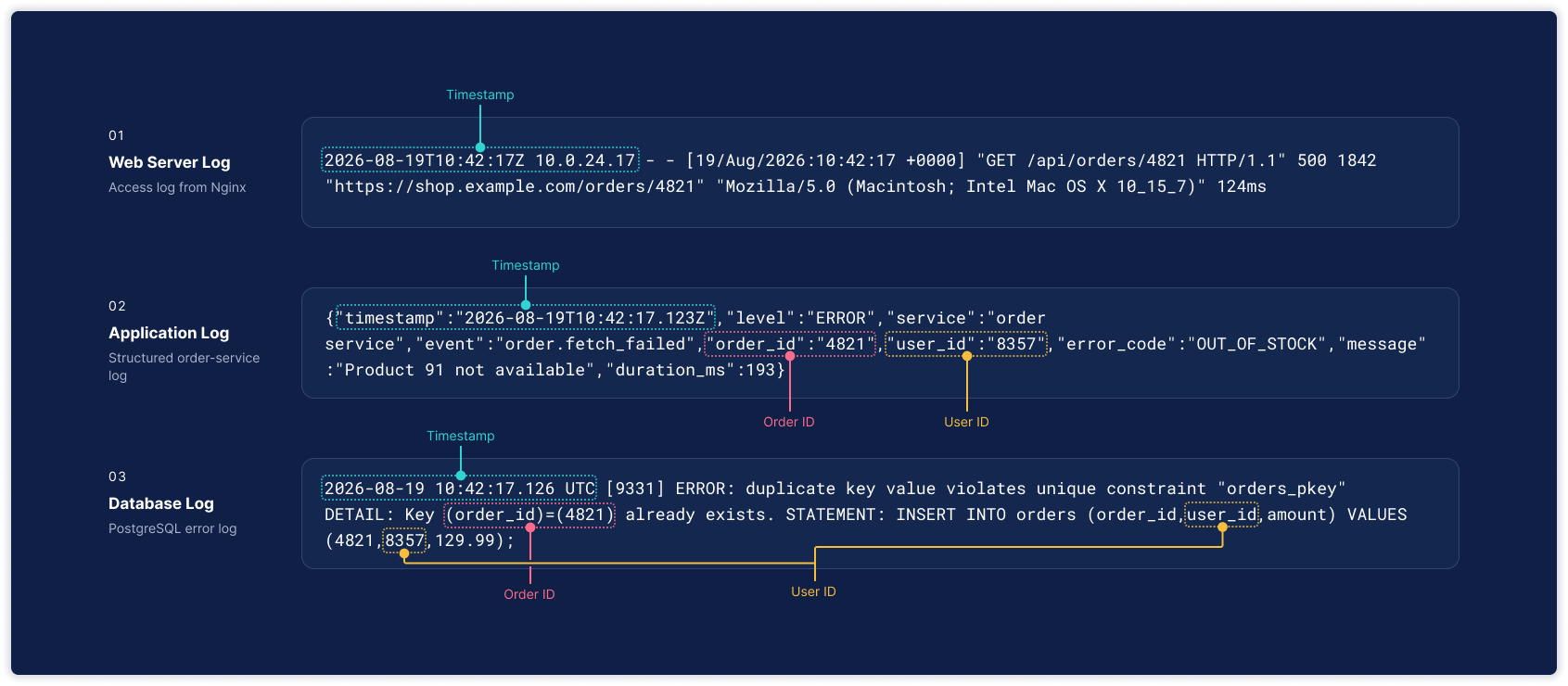
The same event appears across multiple systems — The data is there, but its structure is inconsistent.
Challenge
Users Were Writing Processing Rules Blind
Before raw logs can support investigation, they often need to be transformed into structured fields. Even extracting an IP address could require more than 20 technical steps across GROK patterns, ingest pipelines, processors, mappings, and testing.
But complexity was only part of the problem.
Design-partner sessions and usability testing with SREs revealed that users were defining transformations without a clear view of their data or a reliable way to preview the results.
A wrong mapping or pattern could affect searches, dashboards, and alerts before the problem became visible.
Users were making consequential decisions about data they had not fully seen—with little feedback until those decisions took effect.
No immediate feedback on real data
Insight
The Problem Was Beyond Simplification, It's Understanding Outcomes
Reducing a workflow of more than 20 technical steps would make processing faster, but speed alone would not make it safer or easier to understand.
The more important requirement was to make the relationship between a processing decision and its effect on actual data immediately visible.
The challenge was not only processing complexity—it was understanding the impact of each decision on real data before committing to it.
Validation could no longer remain a separate phase after configuration. It needed to become part of configuration itself.
Users should be able to make a change, inspect what it does, refine it when necessary, and only then commit it. That principle became the foundation of the interaction model.
Users could inspect and refine each transformation against real data before committing it.
Design Solution
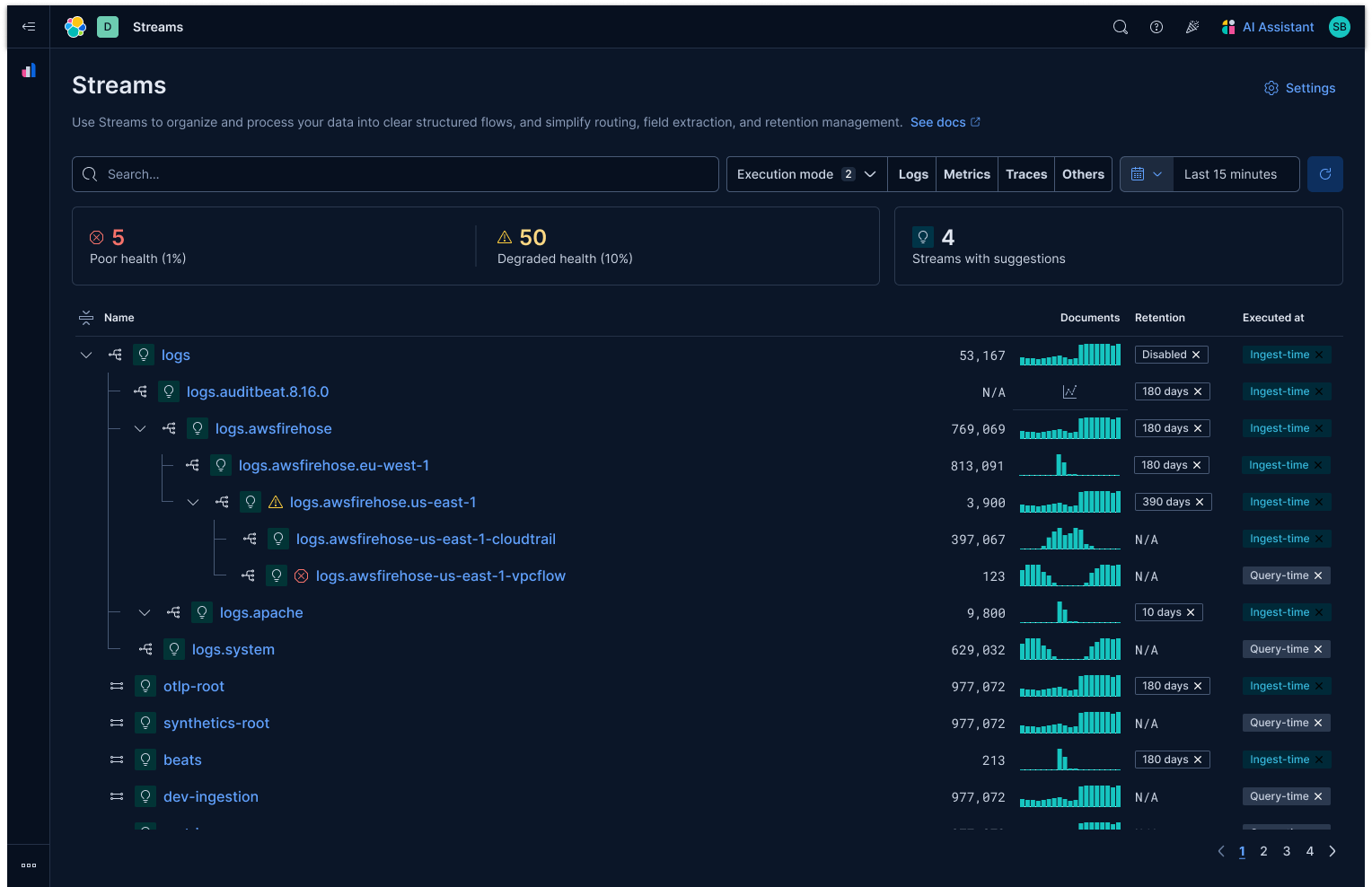
Streams list-Users can scan the stream hierarchy alongside its health, document volume, retention, and execution mode.
Making the Structure Legible
The general solution was to turn Streams from a collection of technical configurations into a system users could see, navigate, and understand. The experience organized streams as a hierarchy, making the relationships between parent and child streams visible alongside their health, document volume, retention, and execution mode. This gave users an immediate view of how their data was structured and where attention was required.
Progressive disclosure kept that complexity manageable. Users could scan the stream list, open a concise overview, and move into a visual architecture when they needed to understand routing relationships in greater depth. The architecture connected each stream to its parents, children, and routing conditions, transforming an abstract configuration into an inspectable flow of data.
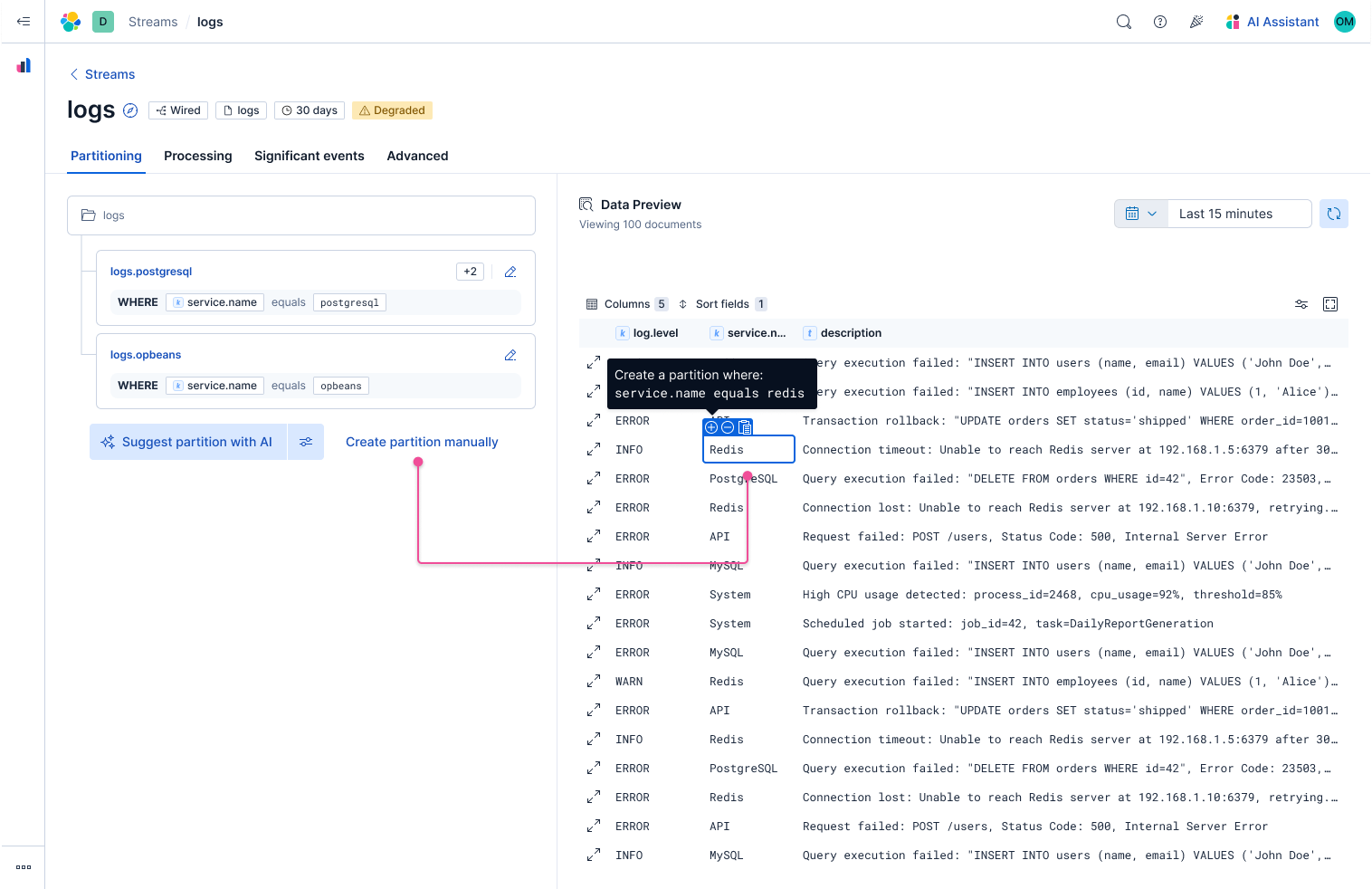
Users can start creating a condition from the Create button or directly from the Data Preview.
Creating Partitions with Real Data
Creating a child stream changes how documents are organized and routed, so the experience connected every rule to the data it would affect. Users could begin manually or create a condition directly from a value in the Data Preview. Selecting “Redis,” for example, prefilled both the child-stream name and the corresponding routing condition, reducing repetitive configuration and keeping the decision grounded in real data.
Once a condition was defined, the interface shifted from Data Preview to Partition Preview. Matched and unmatched views revealed which sampled documents would enter the proposed stream and which would remain outside it. Users could identify conditions that were too broad, too narrow, or based on the wrong field, then refine the rule before making a structural change.
A final confirmation restated the stream name and routing condition. After creation, the child appeared in the hierarchy and the interface returned to Data Preview, now scoped to the resulting stream.
The flow became:
Select data → Define → Preview → Refine → Confirm → Inspect
By clearly separating the current data, the proposed partition, and the resulting stream, the experience made partitioning faster without hiding its consequences.
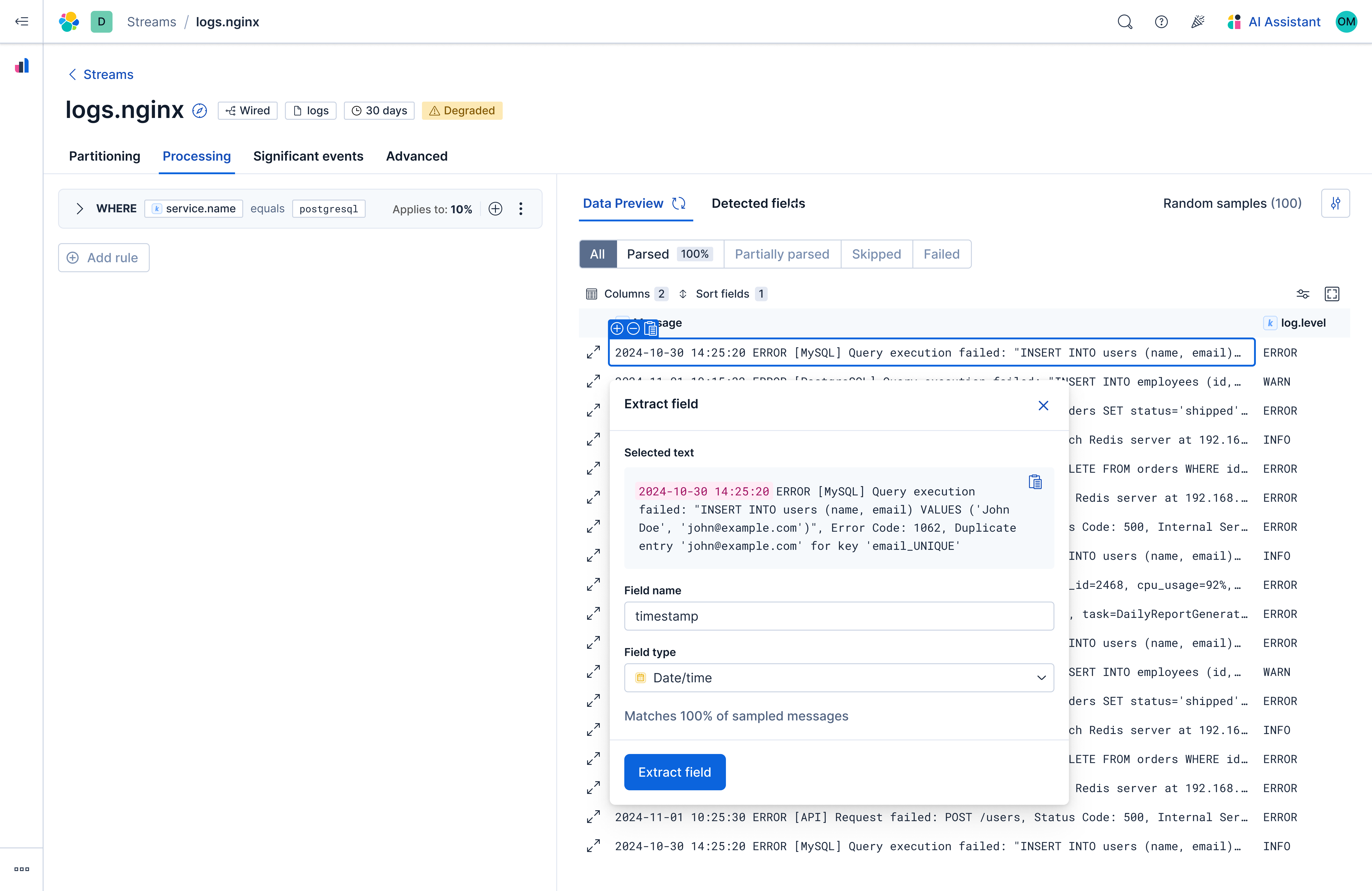
Manual flow-Users select text directly from the data; the system translates that intent into a processing rule.
Two Paths, One Interaction Model
The manual and AI flows supported different user starting points while preserving the same preview-and-validate experience.
Manual Flow — Intent-Led
Users already know what they want to extract.
- Select meaningful text directly from the data
- Let the system translate that intent into a processing rule
- Preview the result before applying it
This replaced writing syntax with direct manipulation: select → define → validate.
AI Flow — Suggestion-Led
Users may not yet understand the structure of their data.
- Generate a complete pipeline from sampled data
- Compare its effect on the data preview
- Exclude unnecessary or redundant processors
- Apply only the reviewed suggestions
The user's task shifts from constructing rules to evaluating outcomes: suggest → inspect → decide.
Both paths kept the same principle: every change remained visible, explainable, reversible, and grounded in real data.
Reflection
From Configuration to Informed Decisions
Simplifying a technical workflow does not mean hiding its complexity. It means helping users understand the effect of each decision before committing to it.
The two processing paths addressed different moments:
- Manual processing — translated clear user intent into system logic
- AI suggestions — gave users a starting point when the required logic was unclear
- Data preview — kept both paths grounded in observable outcomes
- Review and reversibility — preserved user control
The role of AI was not to make decisions for users, but to reduce the effort required to reach an informed one.
The broader principle:
Complex systems become usable when users can move from intent to outcome without losing visibility, understanding, or control.