Ziv Marmur

AI Ecosystem

Case / 01

AI Ecosystem

Designing a coherent ecosystem for Multi-Surface AI Experiences

Project

Company

Elastic

Year

2025

Environment

Web SaaS

Type

Zero-to-one

Engagement

Role

Design direction

Hands-on

No

Team

2 designers · 2 PMs · 2 Dev. teams

Challenge

From One Assistant to Multiple AI Experiences

Elastic AI Assistant already existed as a dedicated experience. As product teams began embedding AI capabilities directly into workflows, a new challenge emerged.

The challenge wasn't simply making AI available across the product. It was creating a coherent relationship between the AI Assistant and workflow-native AI capabilities, so users never had to wonder which one to use, when to use it, or how they should work together.

Without a shared direction, the product risked becoming a collection of disconnected AI experiences rather than a coherent AI ecosystem.

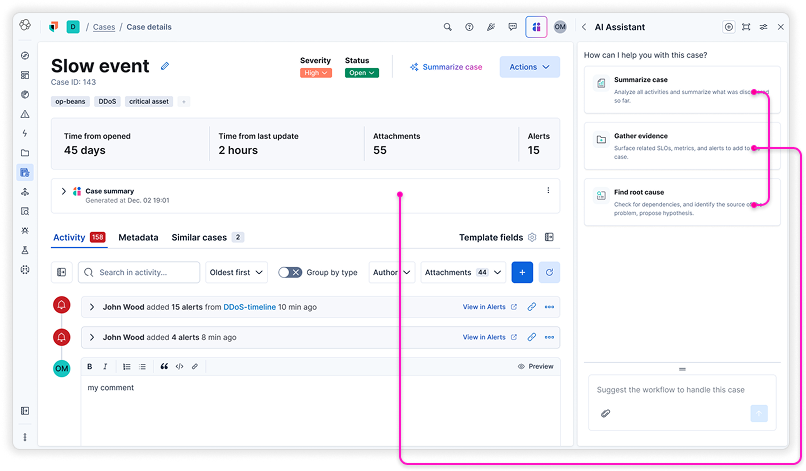
Case-detail view showing an integrated LLM feature next to the AI Assistant panel
Competing AI Capabilities
3

The interface combines an integrated LLM-driven feature with an AI Assistant component.

Design Considerations

The Challenges of Multi-Surface AI

Competing Interaction Models

Similar capabilities appearing on different surfaces created uncertainty about where users should begin and continue their work.

Workflow Fragmentation

Moving between the AI Assistant and product workflows interrupts users' flow and creates unnecessary context switching.

Action Ownership

When multiple AI capabilities could perform similar actions, it became unclear which experience should own execution.

Consistency & Trust

Different behaviors across AI capabilities reduced predictability and weakened user confidence.

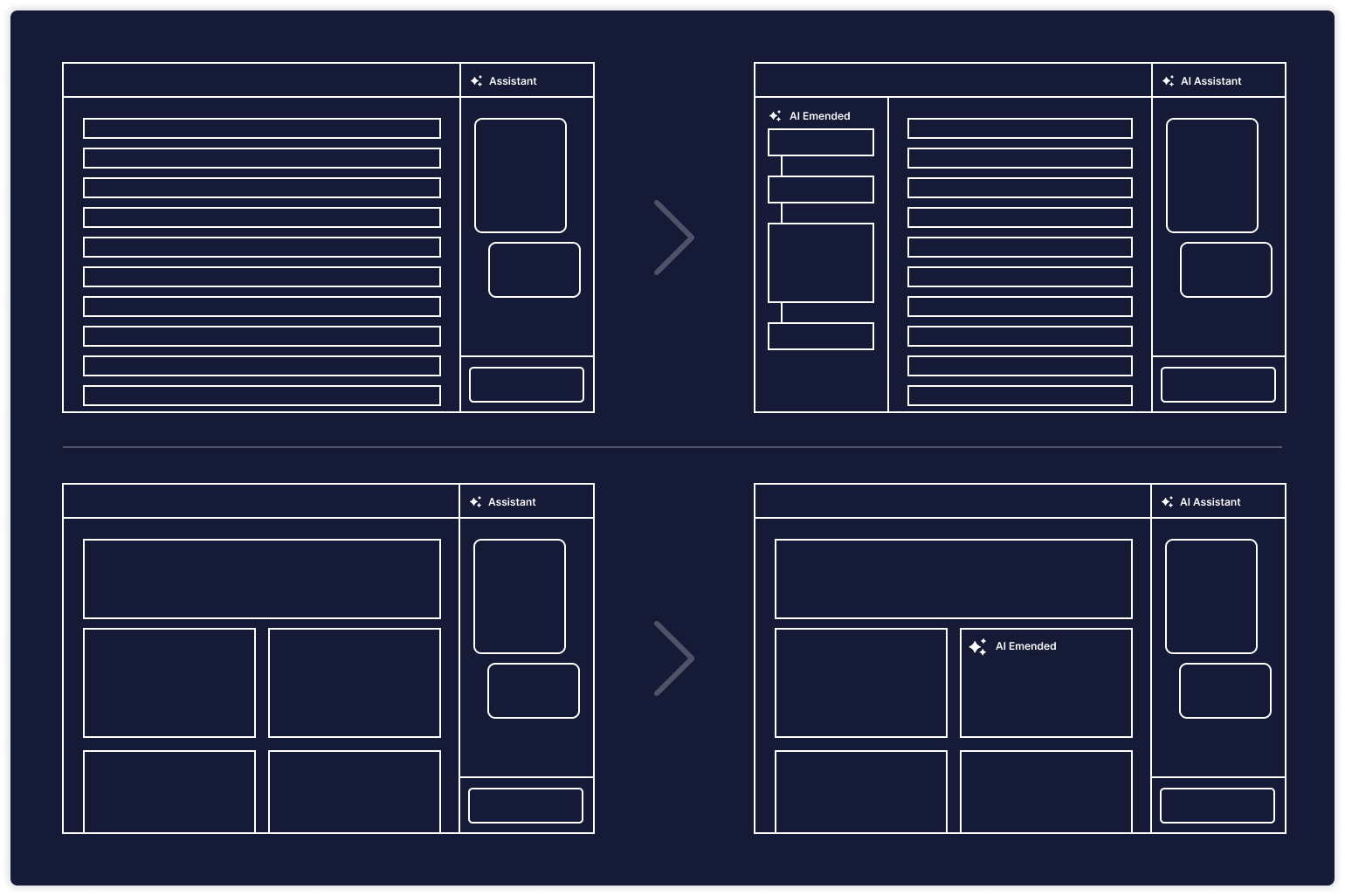
Wireframe of a dashboard layout with the Assistant panel on the right
Wireframe of a list view with inline AI actions and the Assistant panel on the right

Insight

From AI Features to an AI Ecosystem

The breakthrough wasn't designing the AI Assistant or embedded AI capabilities independently. It was defining how they complement one another to create a single, coherent AI experience.

It was defining how different AI capabilities should work together as one coherent system.

Rather than treating the Assistant and workflow-native AI as competing experiences, they needed to complement one another. Their relationship became even more important than the design of any individual capability.

Cross-functionality

Relationship

Continuity

Context

Action Ownership

Interaction Pattern

Design Solution

A Coherent AI Ecosystem

Instead of defining individual AI features, we established a framework that described how AI should operate across the product.

The framework defined:

  • The relationship between AI capabilities
  • The role of each capability
  • How context should flow between experiences
  • Where actions should originate and execute
  • When different interaction models should be used
  • How users could move naturally between AI experiences without losing continuity

Experience principles guidelines

  • Continuity — AI should feel like one product, regardless of where users interact with it.
  • Cross-functionality — Capabilities should complement one another instead of duplicating functionality.
  • Relationships — Every AI capability should have a clearly defined role within the ecosystem.
  • Persistent Context — Information should travel with users instead of requiring them to repeatedly restate context.
  • Interaction Patterns — Different capabilities can use different interaction models, provided they remain recognizable and appropriate for their purpose.
2

Continuous interaction between the different surfaces

Impact

Establishing AI as a Coherent Product Capability

The framework became the foundation for designing AI experiences across Elastic Observability, helping teams integrate new AI capabilities while maintaining a consistent product experience.

Organizational Impact

  • Created a shared language for Product, Design and Engineering when designing AI experiences.
  • Enabled multiple teams to extend AI consistently while allowing each capability to serve a distinct purpose.
  • Reduced the risk of fragmented AI experiences as the platform continued to evolve.
  • Established a scalable foundation for future AI capabilities across Observability and Security.

Measures of Success

  • Are users naturally incorporating AI into their workflows?
  • Do users understand when to use the Assistant versus embedded AI?
  • Are AI capabilities reducing manual investigation?
  • Are users reaching actionable insights faster?
  • Can new AI capabilities be introduced without fragmenting the experience?

AI Integration Guidelines for Designers

Purpose of this Document

This document provides guidelines for deciding when AI capabilities should appear integrated within a page (inline) versus when they should live in the Assistant (side panel).

Our goal is to:

  • Ensure consistency across the product.
  • Support user learnability (users know what to expect).
  • Give designers practical decision criteria (not just intuition).
  • Reduce the risk of duplicated or inconsistent AI experiences.
  • Define bi-directional flows: how users escalate Page work to Assistant, and how they can apply Assistant results back into the Page.

Use this doc when designing new AI-powered features and when reviewing existing ones.

How to Use This Document

  1. When designing an AI feature, review the decision parameters (below).
  2. For each parameter, decide whether it favors Page or Assistant.
  3. Use the scoring checklist to evaluate the overall direction.
  4. If unclear, default to Page (simpler, more discoverable) but include escalation to Assistant.
  5. Remember: users can also move Assistant → Page (apply results back). Plan for both directions.
  6. Document your decision and rationale in the design spec so reviewers understand the trade-offs.

Decision Parameters

AspectPageAssistant (Side Panel)
Content Size / Complexity≤ 2–3 sentences, ≤ 300 charsLonger, structured, reasoning chains
Persistence NeedEphemeral, tied to current entityPersistent thread, cross-session
Action TypeInline updates (summaries, highlights, insights)New artifacts (cases, what-if scenarios, reports)
Error ToleranceLow-risk, deterministicProbabilistic, exploratory, subjective
User Effort1-click, no promptRequires prompting, iterative dialog
Collaboration NeedPrivate, localShared/exportable
Context ContinuitySingle entity onlyMulti-entity, cross-page, memory-aware

Scoring Checklist

  • Content is short/simple
  • User doesn't need to revisit later
  • Output directly augments existing page
  • Low error risk
  • Minimal user effort required
  • Private/local use
  • Context doesn't persist beyond page

If ≥ 5 boxes checked → Page (inline).

If < 5 boxes checked → Assistant.

If balanced → Start in Page, offer escalation to Assistant.

Bi-Directional Flows

1. Page → Assistant (Escalation)

  • Triggered when the user needs more detail, longer output, or reasoning.
  • Pattern: “Open in Assistant” → auto-injects inline result and current context.
  • Keeps continuity: conversation starts where inline left off.

2. Assistant → Page (Application)

  • Triggered when the user wants to materialize Assistant work into the page.
  • Patterns:
    • Apply: Insert a generated summary/insight into the page.
    • Replace: Update an existing field with AI-generated refinement.
    • Insert: Add Assistant content into editable state (e.g., draft case description).
    • Link: Keep result in Assistant but create a reference/link inside the page.
  • Must show traceability (e.g., “Generated by Assistant on [timestamp]”).
  • Handle context mapping: confirm where content will land if a user changed pages since generating it.

Design Guardrails

  • No duplication: Do not show full outputs in both places; use escalation or apply patterns.
  • Context awareness: Assistant always displays context tags (e.g., “Service X, Logs Y”).
  • Voice consistency: Brand tone must be identical; only length/format differ.
  • Transparency: If Assistant carries context across pages, show indicator (“Using context from Service A, Incident B”).
  • Collaboration: Only Assistant outputs should be optimized for sharing/export, unless explicitly promoted back to Page.
Reflection

From Capabilities to Relationships

As AI becomes an integral part of complex products, consistency alone isn't enough.

Users need to understand how different AI capabilities relate to one another, when to use each one, and how they work together.

Designing those relationships early creates a foundation that allows AI capabilities to emerge, evolve, and expand without becoming fragmented.

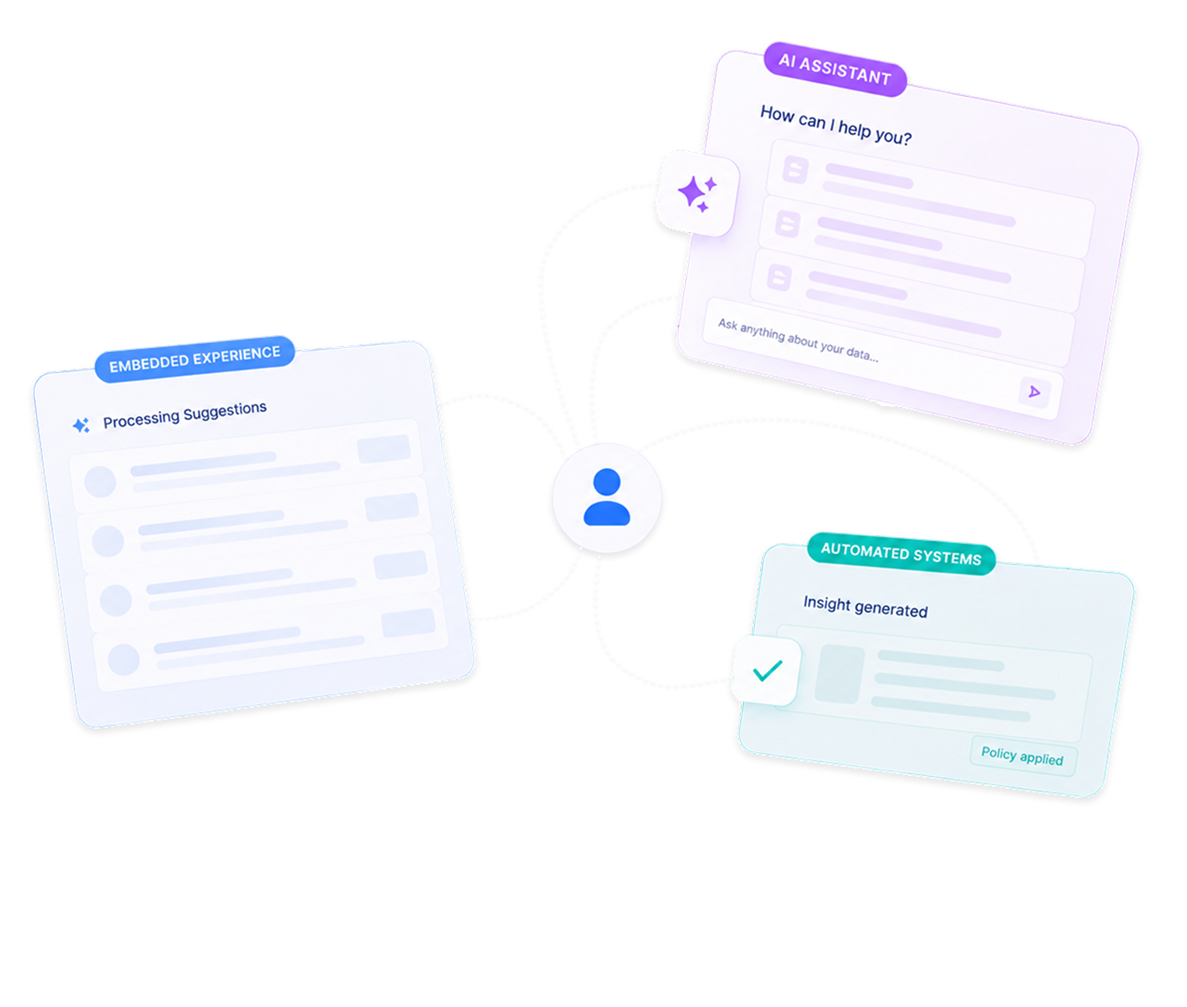
Three AI capabilities — Workflow experience, AI Assistant, and Automated systems — connected around a central user